Table of Contents
- Introduction
- What is WhatsApp Business App?
- What is WhatsApp Business API?
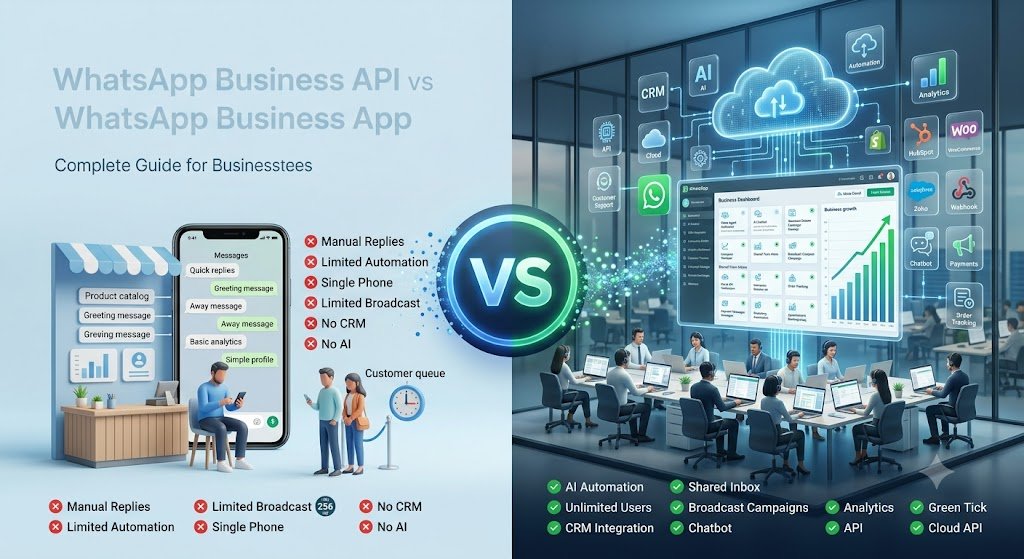
- WhatsApp Business App vs WhatsApp Business API: Comparison Table
- Key Features of WhatsApp Business App
- Key Features of WhatsApp Business API
- Advantages of WhatsApp Business API
- Limitations of WhatsApp Business App
- Which Businesses Should Use the Business App?
- Which Businesses Should Use WhatsApp Business API?
- WhatsApp Business API Pricing Explained
- How to Upgrade from WhatsApp Business App to API
- Common Mistakes Businesses Make
- Frequently Asked Questions (FAQs)
- Final Recommendation
1. Introduction
WhatsApp is no longer just a personal chat app—it is the primary digital highway for customer communication in India. With over 500 million active users nationwide, Indian consumers prefer chatting with businesses on WhatsApp over checking emails, waiting on hold for customer support, or filling out website forms.
As business messaging trends shift toward conversational commerce, customer expectations have skyrocketed. Today’s buyers demand instant automated replies, real-time order tracking, quick appointment scheduling, and 24/7 interactive support directly inside their chat screen.
Choosing between the WhatsApp Business App and the WhatsApp Business API is one of the most critical decisions your company will make. Pick the wrong tool, and you risk getting your phone number banned, losing customer leads, or overwhelming your support team with manual chats.
+-------------------------------------------------------------------+
|               WHATSAPP BUSINESS ECOSYSTEM OVERVIEW                |
+-------------------------------------------------------------------+
|  1. WhatsApp Business App  --> Free, Manual, Max 5 Devices       |
|  2. WhatsApp Business API  --> Enterprise, Automated, Unlimited  |
+-------------------------------------------------------------------+
Key Takeaway: The WhatsApp Business App is designed for micro-businesses handling manual chats on one or two phones, whereas the WhatsApp Business API is an enterprise-grade platform built for scaling automation, multi-agent support, and deep CRM integration.
2. What is WhatsApp Business App?
The WhatsApp Business App is a free, downloadable mobile application available on Android and iOS. Launched by Meta to help small business owners interact with customers locally, it operates similarly to the personal WhatsApp app but adds basic business tools like a business profile, quick replies, and product catalogs.
It works directly on a single smartphone and allows you to link up to 4 additional web/desktop devices. However, all messaging remains manual, relying on human agents to type out responses or trigger basic away messages.
+-------------------------------------------------------------------+
|                  WHATSAPP BUSINESS APP ARCHITECTURE               |
+-------------------------------------------------------------------+
|  [ Mobile Device (Primary) ] <--- Sync ---> [ Up to 4 Web Sessions] |
|                                                                   |
|  • Manual Operation                                               |
|  • Local Storage on Phone                                         |
|  • Max 256 contacts per Broadcast list                            |
+-------------------------------------------------------------------+
Benefits:
- 100% free to download and use.
- Quick and easy setup in under 5 minutes.
- Familiar interface requiring zero technical knowledge.
Limitations:
- No multi-agent team inbox for large support teams.
- Broadcast lists are capped at 256 contacts per list (and messages are only delivered if the customer has saved your phone number).
- Zero automated chatbot capabilities or integration with CRMs.
Best Use Cases:
Local retail stores, boutique shops, freelance consultants, home bakers, and neighborhood service providers handling fewer than 20–30 customer messages daily.
Key Takeaway: The WhatsApp Business App is an ideal starter tool for solopreneurs and hyper-local stores, but it quickly becomes a operational bottleneck once message volume increases.
3. What is WhatsApp Business API?
The WhatsApp Business API (also known as the Meta WhatsApp Cloud API or Business Solution Provider model) is not an app you download from an app store. It is a programmable application programming interface designed for medium to enterprise-level businesses to send and receive messages at scale.
Unlike the standard app, the API has no visual front-end interface of its own. Instead, it connects directly into customer service software, team inboxes, AI chatbot engines, or CRM platforms (such as Salesforce, HubSpot, or custom software setups).
+-------------------------------------------------------------------+
|                  WHATSAPP BUSINESS API ARCHITECTURE               |
+-------------------------------------------------------------------+
|  [ Customer WhatsApp ] <--- Meta Cloud API ---> [ Your CRM / AI Bot ] |
|                                                       |           |
|                                       +---------------+-------+   |
|                                       |                       |   |
|                                [ Agent 1 ]  [ Agent 2 ]  [ Agent N]|
+-------------------------------------------------------------------+
Cloud API vs. BSP Model:
- Meta Cloud API: Hosted directly on Meta’s secure cloud servers. It offers faster deployment, lower infrastructure latency, and zero hosting fees paid to third parties.
- Business Solution Provider (BSP): Official Meta partner agencies that build custom software dashboards, team inbox tools, and AI chatbots on top of the Meta API framework.
Why Growing Businesses Use It:
It enables unlimited team agents to log in simultaneously under one official phone number, run automated marketing campaigns to millions of opted-in contacts, deploy smart AI chatbots, and qualify leads automatically without manual intervention.
Key Takeaway: The WhatsApp Business API transforms WhatsApp from a simple texting app into a powerful sales engine, automated support center, and marketing platform.
4. WhatsApp Business App vs WhatsApp Business API Comparison
| Feature / Parameter | WhatsApp Business App | WhatsApp Business API |
|---|---|---|
| Target Audience | Micro-businesses & Solopreneurs | Growth SMBs, eCommerce & Enterprises |
| Cost | 100% Free | Platform subscription + Meta conversation charges |
| Number of Users | 1 Phone + 4 Web Linked Devices | Unlimited team agents simultaneously |
| Shared Team Inbox | Basic (Shared WhatsApp Web) | Advanced multi-agent team inbox with agent routing |
| Automation Level | Basic Away & Greeting Messages | Advanced AI Chatbots, auto-routing & multi-turn flows |
| Broadcast Messaging | Limited to 256 saved contacts per list | Unlimited contacts (based on messaging tier) |
| Message Delivery Guarantee | Only if customer saved your number | 100% delivery to opted-in users (no number saving required) |
| CRM Integration | Not possible | Native integration (HubSpot, Salesforce, Shopify, Zoho) |
| Green Tick Verification | Not available | Eligible for official Green Tick Verified Badge |
| Analytics & Reporting | Basic (Sent, Delivered, Read counts) | In-depth conversion, response time & agent analytics |
| API & Webhook Access | No | Full REST API & Webhook access |
| Risk of Account Ban | High if doing manual broadcasts | Near Zero (Fully compliant with Meta policies) |
Key Takeaway: While the Business App offers free entry with strict operational limitations, the API unlocks scalable infrastructure, complete automation, and compliance with Meta’s enterprise policies.
5. Key Features of WhatsApp Business App
- Verified Business Profile: Displays business name, address, email, website link, and operational hours.
- Digital Product Catalog: Showcase up to 500 items or services directly on your profile page with prices and descriptions.
- Quick Replies: Save and reuse frequently sent text templates using simple keyboard shortcuts (e.g., typing
/thanks). - Chat Labels: Color-code active customer chats into custom buckets like “New Lead,” “Pending Payment,” or “Order Complete.”
- Automated Away Messages: Set up basic greeting greetings for new visitors or automated away responses outside working hours.
Key Takeaway: The app’s features focus on organizing basic manual text chats for individual operators.
6. Key Features of WhatsApp Business API
- Interactive Message Buttons: Send messages containing CTA buttons (e.g., “Pay Now,” “Track Order”) and Quick Reply options to increase click rates.
- Pre-Approved Message Templates: Send bulk promotional offers, delivery alerts, and order updates using pre-verified Meta templates.
- AI Conversational Bots: Deploy generative AI bots that answer complex FAQs, qualify leads, and close sales autonomously.
- Automated Event Triggers: Automatically trigger WhatsApp texts when specific web events occur (e.g., cart abandonment, payment failure).
- Centralized Multi-Agent Routing: Automatically assign incoming customer queries to specific department specialists (Sales, Support, Billing).
Key Takeaway: The API unlocks rich interactive messaging features that drive higher customer engagement and direct sales conversions.
7. Advantages of WhatsApp Business API
+-------------------------------------------------------------------+
|               WHATSAPP BUSINESS API ADVANTAGES                    |
+-------------------------------------------------------------------+
|  • Multi-Agent Team Support (One Number, 50+ Agents)              |
|  • 24/7 AI Chatbots & Automated Lead Qualification                |
|  • Native Integration with Shopify, WooCommerce, & CRMs           |
|  • Automated Abandoned Cart & Order Status Notifications           |
|  • High-Volume Promotional Campaigns with Interactive Buttons     |
+-------------------------------------------------------------------+
1. Multi-Agent Team Support
Eliminate the need to hand physical phones around the office. With a centralized shared team dashboard, 10, 50, or 200 customer support executives can handle incoming queries simultaneously under one official WhatsApp business number.
2. 24/7 AI Chatbot Engine
Deploy AI chatbots that understand intent, handle FAQs, collect contact details, and book appointments 24/7—even when your team is offline.
3. Seamless CRM & eCommerce Integrations
Connect your WhatsApp channel directly to Shopify, WooCommerce, Zoho, or Salesforce. Automatically dispatch payment links, shipping confirmation details, and abandoned cart recovery reminders without human intervention.
4. High-Converting Marketing Automation
Send personalized promotional offers and festive campaign broadcasts to thousands of opted-in customers in seconds. Interactive buttons allow customers to purchase or book in one tap.
Key Takeaway: Utilizing the API elevates your operational efficiency, drastically reduces response times, and multiplies your sales capacity through smart automation.
8. Limitations of WhatsApp Business App
+-----------------------------------------------------------------------+
| ⚠️ WARNING: RISKS OF USING THE BUSINESS APP FOR BULK MESSAGING        |
+-----------------------------------------------------------------------+
| Meta aggressively monitors broadcast spam on standard WhatsApp apps.  |
| Sending unsolicited promotional broadcasts using the Business App will|
| result in swift, permanent account phone number bans.                 |
+-----------------------------------------------------------------------+- Strict 256-Contact Broadcast Cap: You cannot scale your marketing outreach. Broadcasts fail completely if recipients don’t save your exact phone number.
- Lack of Real Automation: No dynamic webhooks, automated trigger sequences, or CRM updates.
- High Operational Risk: If your single primary smartphone is lost, damaged, or disconnected from Wi-Fi, all linked desktop web sessions disconnect immediately.
- Zero Accountability & Analytics: Business owners cannot track individual agent performance, average response speed, or query resolution rates.
Key Takeaway: Relying on the standard Business App to run large marketing broadcasts or support teams creates major operational vulnerabilities and account suspension risks.
9. Which Businesses Should Use the Business App?
The standard WhatsApp Business App remains a useful tool for specific smaller operations:
- Local Retail Outlets & Grocery Stores: Taking neighborhood delivery orders manually.
- Solo Freelancers & Consultants: Managing direct personal communications with 5–10 clients daily.
- Home-based Businesses: Boutique bakeries or handmade craft artisans starting out with low order volumes.
- Local Dining Spots & Cafes: Handling basic table reservations and sharing food menu PDFs locally.
Key Takeaway: If you receive fewer than 30 incoming inquiries per day and require no team collaboration or system automation, stick with the free Business App.
10. Which Businesses Should Use WhatsApp Business API?
Switching to the WhatsApp Business API becomes necessary for growing organizations across several industries:
- eCommerce & D2C Brands: Recover abandoned shopping carts, send automated Cash-on-Delivery (COD) verification messages, and handle order tracking updates seamlessly.
- Healthcare Facilities & Hospitals: Automate patient appointment schedules, dispatch diagnostic lab reports securely, and send automated medication reminders.
- Educational Institutes & Coaching Centers: Qualify student admission leads instantly, send exam schedule alerts, and collect course fees via automated WhatsApp payment links.
- Real Estate Developers: Send virtual property tour videos, qualify home buyers automatically, and book site visits for sales teams.
- Financial & Insurance Services: Deliver instant policy updates, process loan application statuses, and provide secure banking query support.
Key Takeaway: Any business experiencing high message volume, employing multiple team members, or relying on automated CRM flows must use the WhatsApp Business API.
11. WhatsApp Business API Pricing Explained
Understanding the pricing model of the WhatsApp Business API is straightforward once broken down into its core components:
+-------------------------------------------------------------------+
|               WHATSAPP BUSINESS API COST STRUCTURE                |
+-------------------------------------------------------------------+
|  Total Cost = Meta Conversation Fees + BSP Platform Subscription  |
|                                                                   |
|  • Meta Conversation Charges: Based on 24-hour message windows    |
|  • BSP Platform Fee: Monthly software fee for inbox & dashboard   |
+-------------------------------------------------------------------+
1. Meta Conversation Charges
Meta charges businesses based on 24-hour conversation windows according to four distinct categories:
- Marketing Conversations: Business-initiated messages promoting products, seasonal offers, or new arrivals.
- Utility Conversations: Business-initiated transactional alerts such as order confirmations, payment receipts, or billing updates.
- Authentication Conversations: One-time passcodes (OTPs) sent to verify user log-in identities securely.
- Service Conversations: User-initiated conversations where a customer messages your business first. All incoming replies within a 24-hour window fall under this tier.
2. BSP / Platform Subscription Fees
Official Meta Business Solution Providers (BSPs) charge a monthly subscription fee to provide the software interface, multi-agent dashboard, flow builder, and chatbot engine that connects to Meta’s API.
Key Takeaway: Unlike SMS messaging which charges per individual text, WhatsApp API uses a 24-hour conversation window model, making customer interactions far more cost-effective.
12. How to Upgrade from WhatsApp Business App to API
Transitioning from the standard Business App to the official Meta Business API follows a clear step-by-step process:
- Prepare Your Phone Number: Decide whether to use your existing business phone number or acquire a clean new number dedicated exclusively to the API.
Note: If migrating an existing WhatsApp App number, you must delete your current WhatsApp account from the phone app first to free up the number for API registration.
- Set Up Your Meta Business Manager Account: Ensure your company has an active, verified Meta Business Manager account with access to your business registration documents (e.g., GST certificate, incorporation certificate).
- Select an Official Meta BSP Partner (Verdeship): Register with a Meta partner platform like Verdeship to access user-friendly inbox dashboards and chatbot engines.
- Complete Display Name & Verification: Submit your desired business display name to Meta for instant approval, ensuring it matches your legal branding.
- Verify API Integration & Launch: Connect your API account to your CRM software, configure your multi-agent routing rules, build your AI chatbot workflows, and go live!
Key Takeaway: Upgrading to the API is a seamless process when guided by an experienced solution partner, preserving your business identity while unlocking enterprise scalability.
13. Common Mistakes Businesses Make
- Using Unofficial WhatsApp Automation Tools: Using unauthorized bulk-messaging desktop software leads to immediate, permanent number bans by Meta. Always use official Cloud API channels.
- Sending Promotional Blasts Without Customer Opt-ins: Messaging users who have not explicitly opted in leads to high report rates, damaging your API quality rating.
- Failing to Get Message Templates Approved: Initiating outgoing customer conversations without using pre-approved Meta message templates causes messages to fail.
- Ignoring Message Quality Ratings: Meta monitors customer feedback on your outbound broadcasts. Sending spammy content lowers your messaging limit tiers automatically.
- Neglecting Human Hand-off in Chatbots: Failing to provide a easy option to connect with a live human support executive frustrates buyers when dealing with complex queries.
Key Takeaway: Adhere strictly to Meta’s official messaging policies and prioritize user experience to maintain a high sender reputation and maximize campaign ROI.
14. Frequently Asked Questions (FAQs)
Q1: Can I use the same phone number for both the WhatsApp Business App and WhatsApp API?
A: No. A phone number can only be active on one channel at a time. To move a number to the API, you must delete the account from the mobile app first.
Q2: Will I lose my past chat history when upgrading to the API?
A: Standard WhatsApp mobile app chat history cannot be migrated directly into the API software dashboard. However, you can export and back up your mobile chats prior to migration.
Q3: How long does it take to get approval for the WhatsApp Business API?
A: With Meta Cloud API, account provisioning takes less than 30 minutes. Full Meta Business Verification generally takes 1 to 3 business days.
Q4: Do my customers need to save my phone number to receive API broadcasts?
A: No! Unlike the Business App, API broadcasts are delivered to 100% of opted-in users regardless of whether they have saved your contact details.
Q5: What is the Official Green Tick Badge on WhatsApp?
A: The Green Tick is an official verification badge displayed next to your business name, proving to customers that your brand is authenticated by Meta.
Q6: How do I apply for a Green Tick badge?
A: You can apply for Green Tick verification directly from your WhatsApp API dashboard once your Meta Business Manager account is fully verified and your brand has established press authority.
Q7: Can I send promotional messages using the API?
A: Yes! Meta permits promotional marketing broadcasts using pre-approved Marketing Message Templates containing rich media and interactive call-to-action buttons.
Q8: What happens if a customer blocks my WhatsApp API account?
A: If your block/report rates increase, Meta will lower your sender quality rating score. If quality remains low, your daily message sending limits will drop automatically.
Q9: Is there a daily limit on how many messages I can send using the API?
A: New API accounts start at Tier 1 (1,000 unique business-initiated contacts per 24 hours) and automatically scale to 10,000, 100,000, and unlimited messaging tiers based on high quality ratings.
Q10: Can I integrate WhatsApp Business API with Shopify and Zoho?
A: Yes! The API integrates natively with Shopify, WooCommerce, Zoho, HubSpot, Salesforce, and custom CRM platforms via Webhooks.
Q11: Do I need a developer team to manage WhatsApp API?
A: Not if you partner with an official BSP like Verdeship. No-code dashboards allow non-technical teams to manage chats, build bots, and run campaigns easily.
Q12: Is WhatsApp Business API secure for sending financial data?
A: Yes. All communications sent across the WhatsApp Business API are secured using Meta’s end-to-end encryption standards.
Q13: Can I place call-to-action buttons on my WhatsApp API messages?
A: Yes! You can attach Quick Reply buttons (e.g., “Yes,” “No,” “Speak to Agent”) and Call-to-Action URL/Phone buttons on all outgoing templates.
Q14: What is a 24-hour customer service window?
A: When a customer sends you a message, a 24-hour service window opens. Within this window, your team or AI bot can send free-form messages without requiring approved templates.
Q15: What are pre-approved Message Templates?
A: Format frameworks submitted to Meta for verification before initiating outgoing conversations outside the 24-hour customer service window.
Q16: How do automated payment links work inside WhatsApp chats?
A: You can integrate payment gateways (such as Razorpay or Cashfree) directly into your chatbot workflows, allowing buyers to complete transactions without leaving WhatsApp.
Q17: What is the difference between Cloud API and On-Premises API?
A: Cloud API is hosted directly on Meta’s global cloud infrastructure (faster, lower cost), whereas On-Premises API required self-hosted servers managed by third parties.
Q18: Can I send PDF invoices and video clips over the API?
A: Yes! The API supports rich media attachments including PDF documents, images, video clips, location tags, and audio notes.
Q19: How does the AI Chatbot hand off a complex chat to a human agent?
A: When the bot detects complex queries or explicit keywords (e.g., “human,” “agent,” “help”), it routes the chat to an available support representative’s inbox automatically.
Q20: Why should I choose Verdeship for setting up WhatsApp API?
A: Verdeship provides an end-to-end official setup, custom AI chatbot development, CRM integrations, and specialized 24/7 technical support to ensure your campaigns deliver maximum ROI.
15. Final Recommendation
Choosing between the app and the API depends entirely on your business scale, customer chat volume, and long-term growth objectives:
+-------------------------------------------------------------------+
|                     FINAL DECISION MATRIX                         |
+-------------------------------------------------------------------+
|  Choose WhatsApp Business App IF:                                 |
|  • Solopreneur / Local neighborhood store                         |
|  • Fewer than 30 incoming customer messages daily                 |
|  • Single phone operation with no automation needs                |
|                                                                   |
|  Choose WhatsApp Business API IF:                                 |
|  • Growing SMB, eCommerce brand, or enterprise organization       |
|  • High message volume requiring team coordination                |
|  • Need 24/7 AI chatbot automation, CRM links, & bulk broadcasts   |
+-------------------------------------------------------------------+
If your team struggles with missed chat leads, delayed customer support replies, or limited broadcast capabilities, upgrading to the **WhatsApp Business API** is the logical next step for your business.
Transform Your Business Communication with Verdeship!
Ready to scale your business messaging, deploy custom AI chatbots, and automate sales conversions on WhatsApp?
At Verdeship, we help businesses unlock the full power of Meta’s WhatsApp Business API through tailored automation solutions:
- Official WhatsApp Business API Setup & Meta Verification
- Custom AI Chatbot Development & Smart Lead Qualification Engines
- Seamless Shopify, WooCommerce, & CRM Integrations
- High-Converting Marketing Campaign & Broadcast Setup
👉 Contact Verdeship Today to Book Your Free WhatsApp API Strategy Session!